Lazada Sponsored Max
Lazada
Add your Lazada Sponsored Max campaigns by ID so DataGlass pulls their spend and sales every hour.
DataGlass needs your Sponsored Max campaign IDs before it can show your Lazada ad spend. Lazada's API lists only one Sponsored Max campaign of each type, so you add the rest by ID once. After that DataGlass pulls their history and updates them every hour.
Get all your campaign IDs at once
- In Lazada Seller Center, open Sponsored Solutions → On-Platform Solutions, then the Data Reports tab → Sponsored Max.
- Set the dates to Last 90 days.
- Scroll to Detailed Breakdown and open the Campaign tab. Each campaign is listed with its Campaign Type and campaignId.
- Click Download, then copy the whole campaignId column.
- Paste it into DataGlass (below). One ID per line is fine.
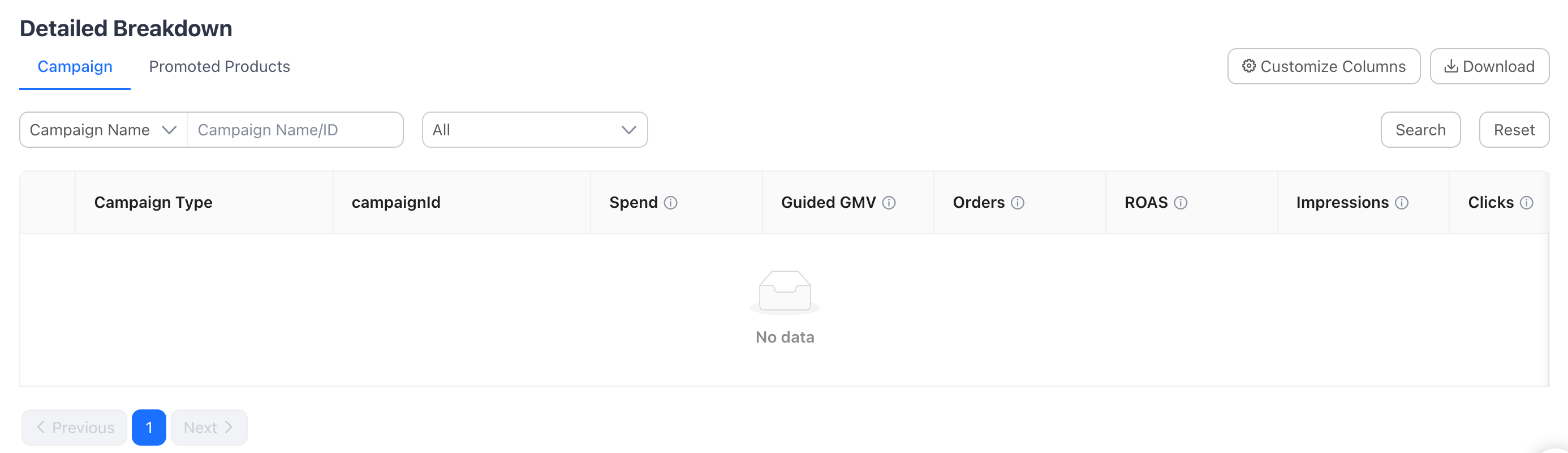
The report lists campaigns that ran in the dates you picked. A campaign that was paused the whole time may be missing; add it one at a time instead.
Or copy one campaign at a time
- Open Sponsored Solutions → On-Platform Solutions → Sponsored Max, and scroll down to the campaign tabs.
- Open Sponsored Max - Product (or New Product Launcher).
- Click the ID icon next to a campaign name. It copies that campaign's ID.
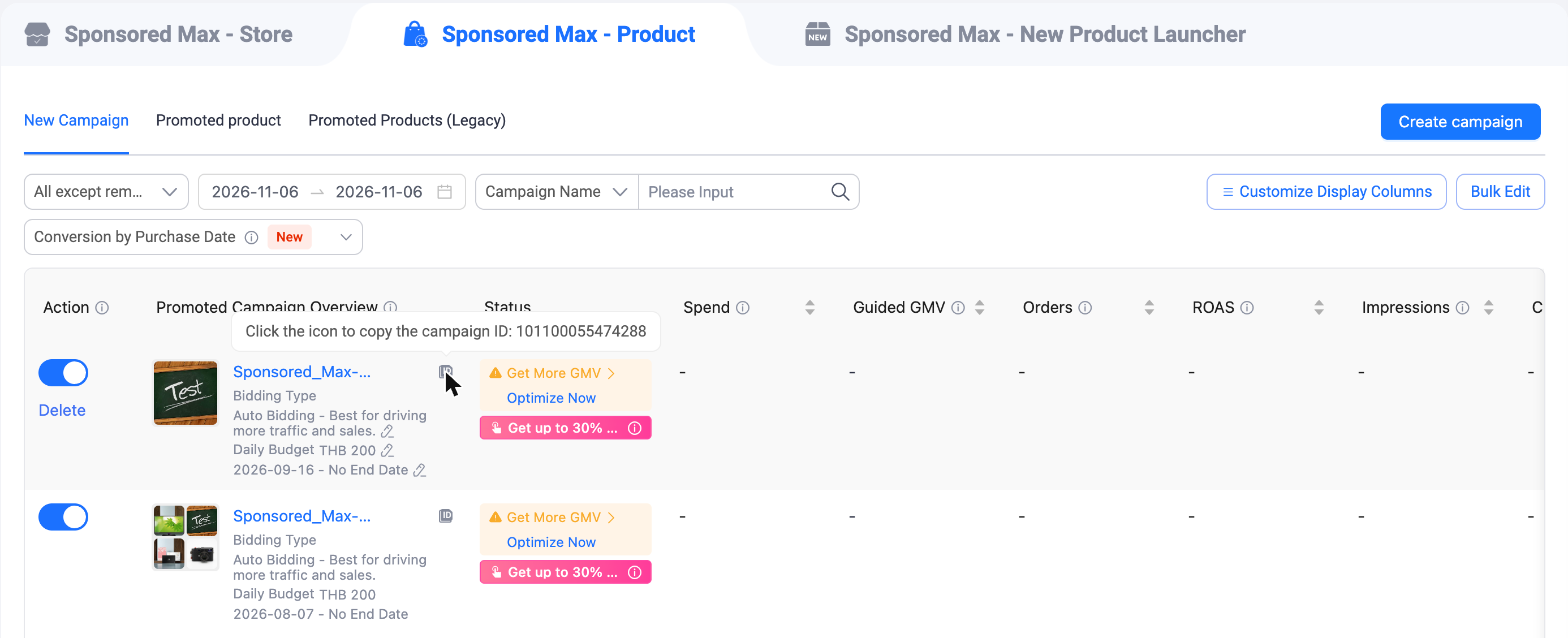
A campaign's own page has the same icon, and its address ends in campaignDetail/ and the ID. DataGlass accepts that whole link too.
Your shop has one Sponsored Max - Store campaign. Its page doesn't show an ID, so take it from the report above. If it isn't listed, contact the DataGlass team.
Add them in DataGlass
- Pick the Lazada shop, then open Ads in the sidebar.
- Click Add campaign IDs.
- Paste the IDs or links, one per line or separated by commas. You can paste many at once.
- Optional: set Pull history from. Leave it empty for the last 6 months, or go back up to one year.
- Click Add and pull history.
DataGlass checks every ID with Lazada first. If any ID is unknown, nothing is saved and the message names the IDs to fix.
After you add them
- Each campaign appears in its own group with its name, budget and status. The history fills in as each batch finishes.
- From the group page you can pause or resume a campaign, and set its daily budget and target ROAS on Lazada.
- New campaigns you create on Lazada later are not picked up automatically. Add their IDs the same way.
- Lazada groups don't reallocate budget automatically yet. A pause or resume changes the campaign on Lazada straight away.