Counterfactual
A campaign always looks good — sales go up. But how much did the campaign actually cause, versus sales you'd have made anyway? The Compare vs no campaign tool answers that. You point it at a quiet stretch of ordinary days (no campaign, no sale) as a baseline, and it uses that to tell real campaign lift apart from your normal everyday sales. It feeds the Campaign phases forecast.
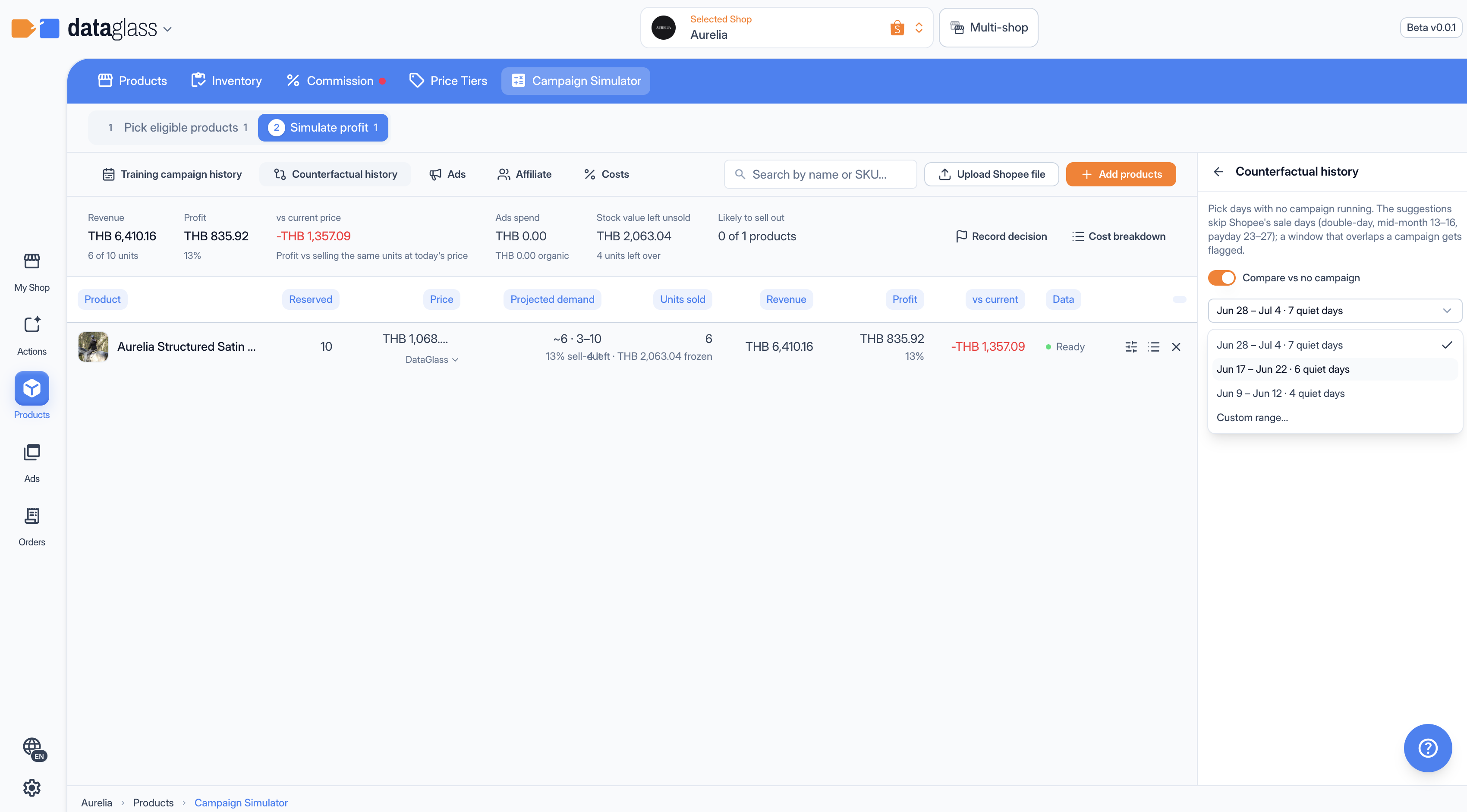 Compare vs no campaign — compare against a quiet baseline window.
Set a baseline
- Turn on Compare vs no campaign.
- Pick a Baseline window. DataGlass suggests clean stretches — each reads from – to · N quiet days — and skips Shopee's sale days (double-day, mid-month 13–16, payday 23–27).
- Or choose Custom range… and pick your own dates.
When an estimate runs with the baseline wired in, a green Counterfactual on chip appears, and each row shows "+N vs no campaign" — the extra units the campaign drove.
Keep the baseline clean
The whole point is that nothing was pushing sales during the baseline. If your window overlaps a sale or campaign, the tool warns "Baseline overlaps a campaign" — the lift it measures will be understated. Pick a genuinely quiet stretch, or take one of the suggestions.